I've been running Claude Cowork with custom skills for months. Copilot Cowork landed in Microsoft's Frontier programme on 30 March, and I wanted to know if the custom skills feature actually works in an enterprise context. Spent the past week testing it.
It does work. But there are things the documentation doesn't quite cover, and some behaviour I only found by breaking it first.
Claude Cowork vs Copilot Cowork
Both products run Claude models. Both have skill systems.
Claude Cowork runs locally on your machine. You own the context, the files, the project state. Copilot Cowork runs in your M365 tenant with tenant-level governance, identity, permissions, and compliance policies baked in. For most enterprises that's not optional.
On skills, Claude Cowork's ecosystem is fairly mature for the AI age. You can package skills, version them, share them, bundle them into kits. Copilot Cowork's skill system is brand new. It works, but it's a SKILL.md file in OneDrive. No packaging layer. No versioning.
The biggest gap is persistence. Claude Cowork carries project context across sessions. Close the app, come back tomorrow, your project is still there. Copilot Cowork doesn't do that yet. Every conversation starts from scratch.
If your organisation is on M365, you're probably not choosing between the two. Copilot Cowork is what you get. Custom skills are how you make it useful.
What the Docs Miss
The documented setup is simple enough. Drop a SKILL.md file in your OneDrive:
OneDrive/Documents/Cowork/Skills/<skill-name>/SKILL.mdYAML frontmatter for name and description, then Markdown instructions. Cowork discovers it automatically and uses the description to decide when to load it.
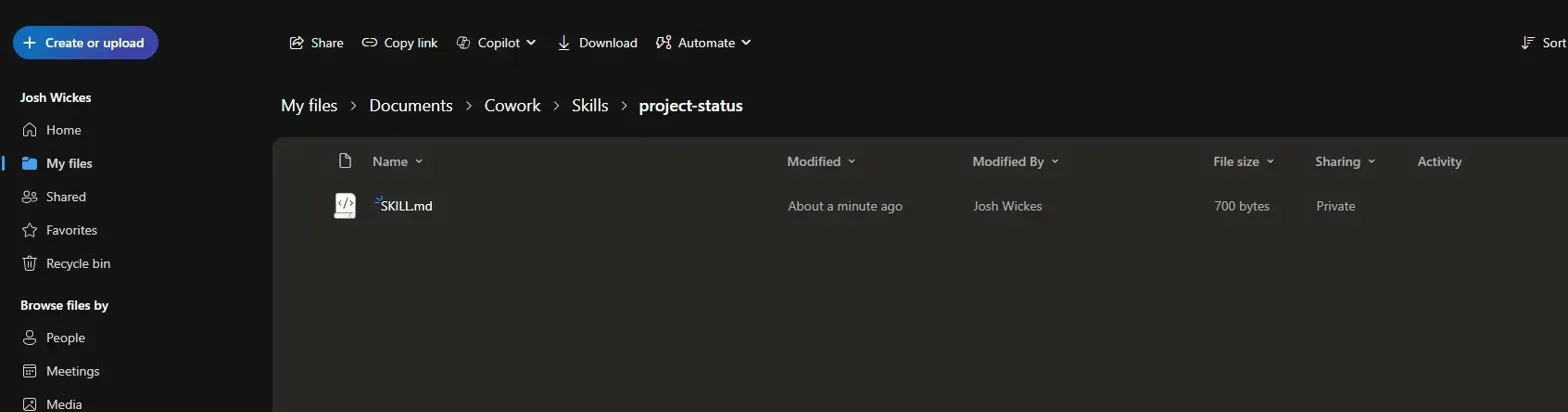
My first skill was a meeting recap which I couldn't get to trigger. Cowork kept deferring to its built-in Meetings skill instead. Custom skills don't override built-ins when there's overlap. The description field needs to target something none of the 13 built-in skills already cover.
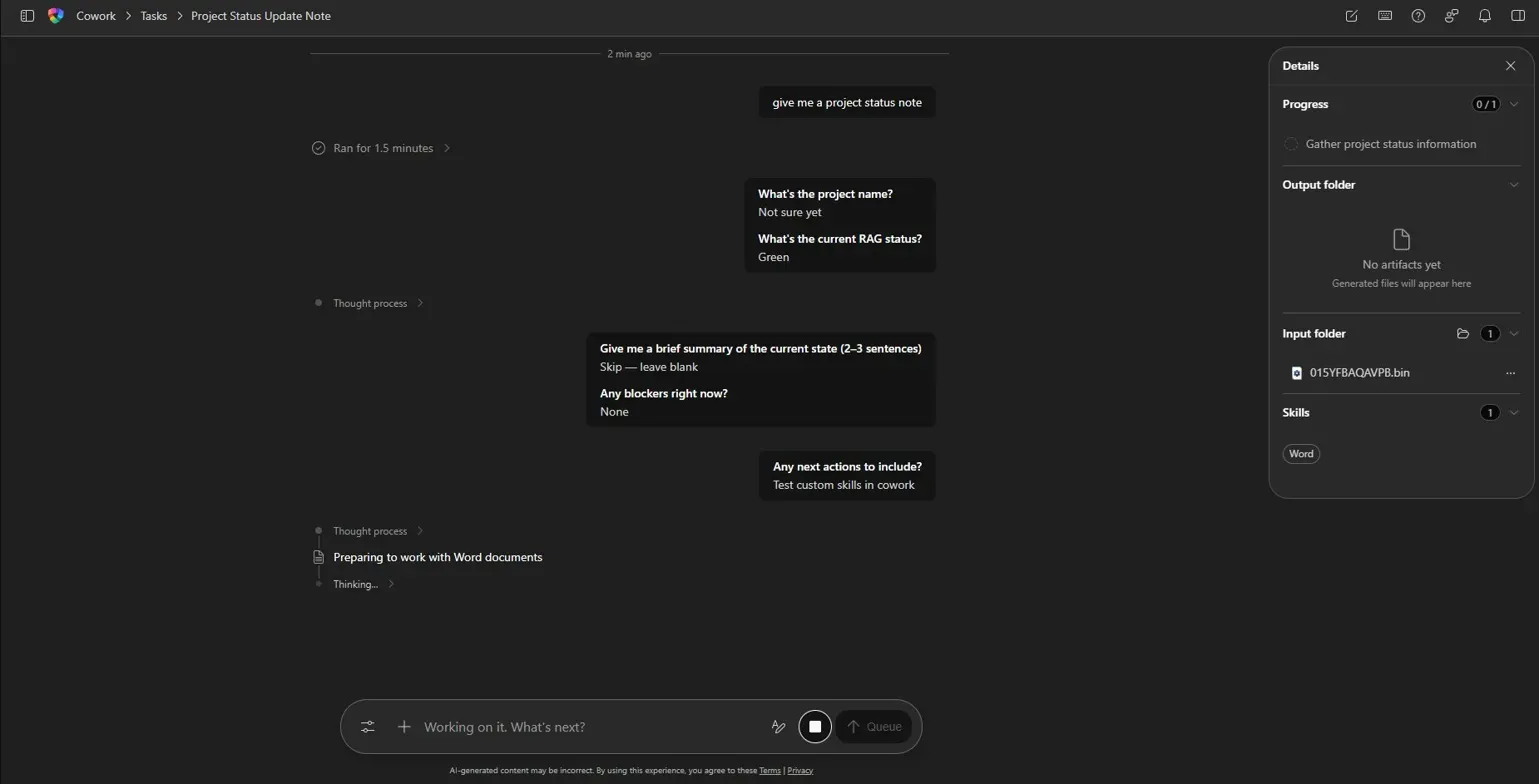
Second attempt was a project status note. Targeted "project status, project update, or project summary note", which doesn't clash with any built-in. One YAML formatting issue later (OneDrive's new markdown renderer makes valid files look broken, always check in a plain text editor) and it triggered.
Cowork asked for project name, RAG status, summary, blockers, and next actions. In sequence. Exactly as specified. I was just trying stuff out. It would be much more useful if it actually gathered the data.
Undocumented Behaviour
Two things the docs don't mention.
First: custom skills don't appear as chips in the Skills panel. The docs say skills show up as chips when loaded. That appears to be built-ins only. Your custom skill won't appear there.
Second: your SKILL.md loads as a binary input file in the Input folder with a generated ID, something like 015YFBAQAVPB.bin. Cowork ingests the skill as context, not as a named skill object. The only reliable way to confirm it loaded is to check the Input folder mid-conversation.
Not elegant. But functional.
Enterprise Use Cases Worth Building
Generic Cowork is fine for one-off tasks. Custom skills are where it gets useful for organisations with specific standards.
Document template enforcement. Your org has a Word template for vendor evaluations. Font, paragraph styles, table format, signature block. Every vendor eval that leaves the building needs to match. A custom skill encodes the template structure and layout constraints. Cowork follows it. No manual reformatting after the fact.
CAB submission generation. Your change governance process requires a structured Change Advisory Board submission: change ID, risk assessment, rollback procedure, stakeholder approval list. You've got a Teams thread about the change. A custom skill takes that thread and produces a CAB submission in your required format. That's hours of copy-paste gone.
PMO status reporting. Your PMO has a standard weekly report format. Executive summary, RAG status, budget variance, risk register top three, next week's blockers. A custom skill generates next week's report in the exact format your PMO expects, every time. Consistent output. No drift.
All three need organisational context that the built-in skills don't have.
Where It Stands
Custom skills work. Deployment is a file in OneDrive. No admin involvement. Document output quality is better than standard Copilot by a noticeable margin.
The missing piece is session continuity. Anything that spans multiple conversations requires you to re-inject context manually. For standalone tasks that's fine. For ongoing project work it's a problem.
If you're on Frontier and your team has workflow standards it actually follows, test this. It's rough. It's a week old. But the mechanism is sound and the use cases are obvious.