Codex memory is useful, but I don't want it deciding which operational lessons become permanent.
That is the problem I was trying to solve.
Built-in memory is good for background continuity: how you like to work, which tools you use often, the sort of context you get tired of repeating. The current Codex documentation is clear about that. Memories can carry useful context from earlier threads into future work, and Codex can store generated memory files under your Codex home directory once you enable the feature.
That is helpful. It is not the same as a memory system I can audit.
If Codex learns that an API call needs field IDs rather than display names, or that one project has a non-obvious source of truth, I do not want that stored as a loose recollection. I want to know where the lesson came from, what evidence supports it, whether it applies globally or only to one project, and who promoted it from candidate note to durable instruction.
That is where my system is better than the built-in one. Not because it remembers more. Because it makes important memories harder to create by accident.
Before this starts to sound like a weekend of file-shuffling, the finished version is not something I rebuild by hand.
I use a Codex project setup skill for that. When I start a new local Codex project, the skill creates the memory scaffold, updates AGENTS.md, adds the project to the registry, and creates the paused curator automation. The point is not to make everyone love my folder structure. The point is to make the right setup repeatable, so I do not have to remember the ritual every time.
That matters. If this system depends on me manually creating the same files in the same order every time, it will drift. The skill turns the guide below into a reusable project pattern rather than a one-off bit of personal admin.
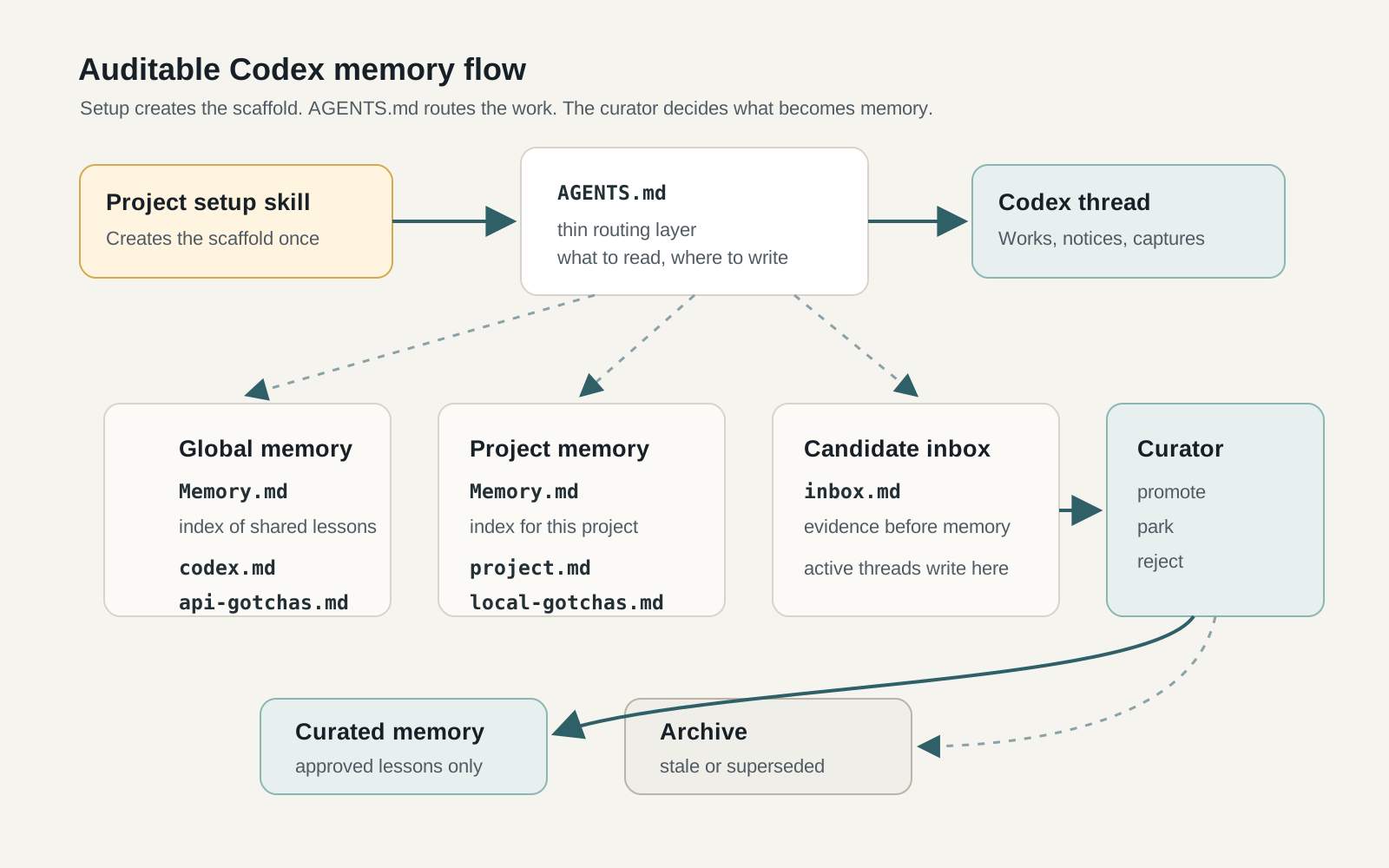
The project instructions stay thin. They route Codex to indexed memory files, a candidate inbox, and a curator step.
Start with the boundary
The first decision is what memory is allowed to be.
For me, Codex memory is not task status. It is not project documentation. It is not the place for meeting notes, publishing records, decisions, drafts or research logs. I keep that kind of material in a separate source-of-truth system. You could use Notion, Obsidian, SharePoint, a wiki, a database, or whatever you already trust.
The important part is the boundary.
Codex operational memory should store lessons about how Codex should work next time:
- tool behaviour that differed from expectation
- API syntax corrections
- failed approaches likely to be retried
- project-specific gotchas
- source-of-truth rules
- workflow shortcuts that genuinely saved time
That is a much smaller category than "things that happened".
This matters because agents are very good at accumulating plausible rubbish. If every run can write a note to memory, memory becomes a slow-moving prompt injection you wrote yourself.
I wanted the opposite: fewer memories, with better evidence.
Use built-in memory for background, not control
Codex's built-in memory feature appears to be designed as a local recall layer. That is the right shape for preferences, recurring workflows, tech stacks, project conventions and known pitfalls. The docs also say to keep required team guidance in AGENTS.md or checked-in documentation, and to treat memories as helpful local recall rather than the only source for rules that must always apply.
That distinction is exactly the point.
Built-in memory can remember me. My system is there to tell Codex how to work.
Those are different jobs. One is ambient context. The other is operational control.
For operational control, I want plain files, visible history, and a promotion step. If something becomes a permanent rule, I want to inspect it later and ask: why is this here?
Create three memory surfaces
The smallest useful version has three surfaces.
First, a global memory root. This is for lessons that apply across projects: Codex behaviour, common tool gotchas, reusable API corrections, and general working rules.
Second, a project memory root. This is for local context: this project's source of truth, awkward commands, specific workflows, known limitations, and gotchas that should not leak into other work.
Third, the project instructions file. In Codex that means AGENTS.md.
AGENTS.md matters because Codex reads it before doing work and layers global guidance with project-specific instructions. That makes it the right place to tell Codex which memory indexes to read, where candidate lessons should go, and which files it is not allowed to edit during normal work.
A project memory folder can be very small:
.codex/memory/
  Memory.md
  inbox.md
  project.md
  local-gotchas.md
  archive.md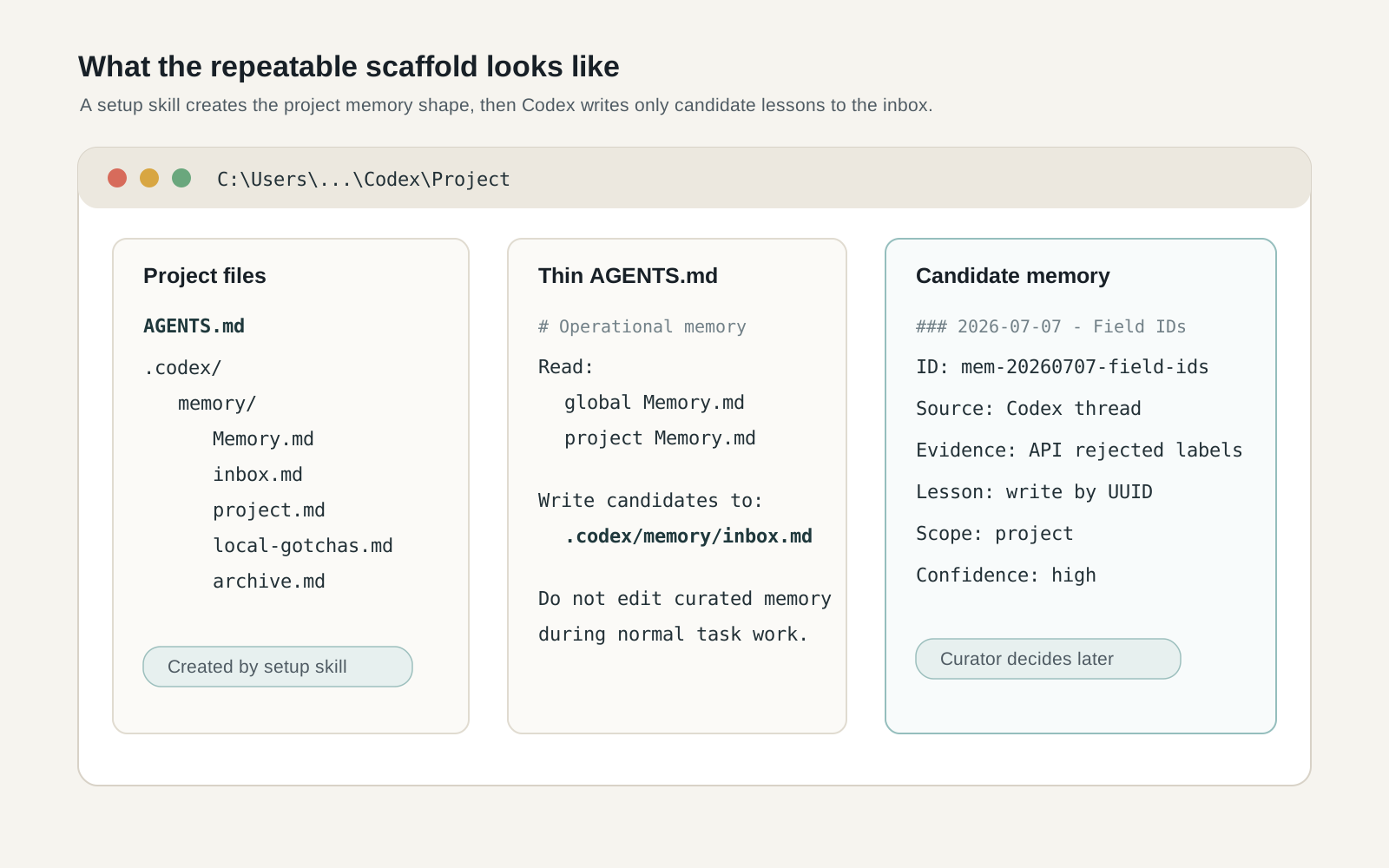
The useful version is small: a thin AGENTS.md file, a project memory folder, and candidate notes with evidence.
Memory.md is only an index. It should point to the files that matter, not become the memory itself.
inbox.md is the normal write target. The active thread can capture candidate lessons, but it cannot promote them.
project.md and local-gotchas.md are curated memory. They should change only when a curator or a deliberate editing step reviews the inbox.
archive.md keeps rejected, stale, superseded or conflict-marked entries. I know that sounds a bit formal for a local AI setup. It stops old mistakes disappearing without trace.
Keep AGENTS.md thin
This is the other reason I prefer the memory-index pattern.
I do not want every project lesson injected into every Codex run. AGENTS.md is always part of the working context, so if I put every tool gotcha, API correction and project note in there, I am paying for that context on every task whether it matters or not.
Worse, I am making Codex carry old context into jobs where it may be irrelevant.
The better pattern is to keep AGENTS.md as a routing layer. It tells Codex where the memory indexes are, what counts as memory, and where new candidates should be written. The detail lives in topic files. Codex reads those only when the index points to something relevant.
That keeps the default context small without making the memory unreachable.
This is one of the practical advantages over stuffing everything into project instructions. The system gives Codex a way to look things up, rather than forcing every run to start with the full operating manual in its head.
Capture candidates, not memories
This is the rule that makes the system work.
A normal Codex thread can write a candidate memory. It cannot write durable memory.
The candidate needs evidence:
### YYYY-MM-DD - Short lesson title
- ID: mem-YYYYMMDD-slug
- Source: Codex thread/task/context
- Evidence: what happened, including the observed error or successful behaviour
- Lesson: the reusable operational point
- Scope: project | global | possible-forward:<target>
- Confidence: low | medium | high
If Codex cannot fill the evidence field, it should not write the candidate.
That one rule cuts out most of the junk. Not all of it. I am not pretending this is magic. But it forces the agent to say what actually happened before it asks future agents to remember the lesson.
Good candidates are API syntax corrections, source-of-truth rules, project-specific gotchas, tool behaviours that differed from expectation, and failed approaches likely to be retried.
Bad candidates are task updates, vague reminders, preference notes, or anything that should live in project documentation instead.
Add a curator step
The curator is the bit most people will skip. I would not.
The curator reads the inbox and decides what happens next. It can promote a candidate into a topic file, leave it in the inbox, archive it, mark it as stale, or mark it as a conflict.
The active thread is allowed to notice. The curator is allowed to decide.
That separation matters because the active thread is too close to the work. It has just seen an error, just fixed a problem, and is very likely to overfit the lesson. I have done this myself. A workaround feels universal when it has just saved you fifteen minutes.
A few days later it may look more limited.
You can do the curator step manually at first. In fact, I would. Once the pattern is stable, make it a Codex automation. Keep it paused until you have smoke-tested it against fake candidates and a few real ones.
Codex automations can run recurring tasks in the background, and the docs explicitly recommend testing automation prompts manually before scheduling them. That advice applies here. A bad memory curator does not just fail; it makes weak notes look official.
Keep project truth somewhere else
This is the bit I would be strict about.
Project truth belongs in your actual knowledge system, not in Codex memory.
If you use Notion, use Notion. If you use SharePoint, use SharePoint. If you use Obsidian, use Obsidian. In my case I have a separate personal system for projects, tasks, drafts, pages, databases and operating records.
The point is not which tool you use. The point is that Codex operational memory should not become a second project database.
When a project decision is made, record it where project decisions live. When a draft is written, store it where drafts live. When a task exists, put it in the task system.
Codex memory should only keep the working lesson: next time you are in this project, read this index first; this workflow uses this manager; this database expects this field format; this source is legacy; do not touch that system unless asked.
That keeps the memory small enough to trust.
Add scope before you add automation
Some lessons belong to one project. Some belong everywhere.
Do not blur them.
A local workaround for one workspace should not silently become global behaviour. That is how an agent starts doing strange things six weeks later and nobody knows which note taught it to behave that way.
I use a simple forwarding model. A project curator can decide that a candidate probably belongs in global memory, but it does not edit the global file directly. It forwards a marked copy to the global inbox with provenance. The global curator can accept, reject or mark conflict.
This delays learning. I am fine with that. Fast propagation is useful only when the lesson is right.
Make it repeatable with a project setup skill
This is the part that turns the system from a clever folder structure into something I will actually keep using.
I created a Codex project setup skill.
When I start a new local Codex project, the skill does the boring setup work I do not want to remember every time:
- create the project workspace
- create
AGENTS.md - add the operational memory block
- create
.codex/memory/ - add
Memory.md,inbox.md,project.md,local-gotchas.mdandarchive.md - update the global memory registry
- create a paused project memory curator automation
That last word, paused, matters. I do not want a new automation running just because a project folder exists. It should exist as part of the scaffold, but it should stay paused until the project has real candidates and the curator prompt has been checked.
This is where a lot of personal AI systems fall over. They depend on the user remembering the ritual. Create this folder, paste that block, update that registry, schedule that job, do not forget the archive file.
I will forget. Most people will forget.
So the pattern needs to be a skill. The skill makes the right setup the default setup.
You could build the same thing with a shell script, a template repo, or a checklist. I prefer a Codex skill because the setup is partly mechanical and partly contextual. It needs to create files, but it also needs to understand the project boundary, source of truth, related systems, and what should not be touched.
The actual setup order
If I were building this again from scratch, I would do it in this order.
1. Decide what memory is for
Write one paragraph before creating any files.
Mine is: Codex memory stores reusable operational lessons about how Codex should work. It does not store project outputs, task status, raw logs, credentials, private payloads or decisions.
2. Create the global memory root
This is where cross-project lessons go. You need an index, an inbox, topic files, a registry, and an archive.
3. Create one project memory root
Do not roll this out to every project at once.
Pick one active project where Codex already does recurring work. Create the small .codex/memory/ folder and update AGENTS.md so Codex knows to read the indexes and write candidates only to the inbox.
4. Write the candidate format
Keep it short enough that Codex will actually use it. Make the evidence field mandatory.
If the candidate format is too heavy, the agent will avoid it or fill it with fluff. If it is too light, it will accept nonsense.
5. Write the curator prompt
The curator prompt should say what it can edit, what it cannot edit, what qualifies for promotion, and what must be archived or marked as conflict.
The strongest rule in mine is that a curator edits only its own memory root. Cross-scope lessons are forwarded, not directly promoted elsewhere.
6. Create a registry
The registry stops old projects becoming permanent automation clutter.
A useful registry row tracks the project name, memory root path, inbox path, curator automation, status, cadence, last run and allowed forwarding targets.
7. Turn it into a setup skill
Once the first project works, do not rely on memory to repeat the memory system. That is too cute, and it will fail.
Make a setup skill or template that creates the same scaffold every time. The goal is not sophistication. The goal is repeatability.
What I would not do
I would not let every thread write directly to curated memory.
I would not store project decisions in memory.
I would not auto-accept forwarded lessons into global memory.
And I definitely would not store secrets. The Codex docs say generated memory fields redact secrets, but that is not an excuse to be sloppy. Do not put credentials, copied tokens, cookies, private payloads or raw logs into memory candidates in the first place.
The test
The test is simple.
After a week, open the project inbox.
If it contains reusable lessons with evidence, the system is working.
If it contains task updates, vibes, vague reminders and things that should have gone into your project notes, the boundary is wrong.
Fix the boundary before adding more automation.
This is the bit I like about the design. It does not require belief. You can inspect the folder. You can see whether the memory is useful. You can see whether a future Codex run has a reason for doing what it does.
Built-in memory helps Codex remember me. This system helps Codex remember how to work without quietly turning guesses into instructions or dragging every old lesson into every new task.
That is the difference.