Two weeks ago I wrote about what Microsoft's Copilot Cowork docs don't tell you. Last week I followed up with what changed in the first seven days. The short version of both: the Anthropic subfolder pattern works. Your SKILL.md can act as a dispatch file that points at supporting content in references/, eval/, and examples/, and Cowork pulls the lot in at runtime.
So the question stops being "can you do this in Copilot Cowork" and becomes "how do you design skills that don't rot the moment your organisation has more than three of them in play".
This is the design guide I wish I'd had when I started building skills for M365 teams. Most of what's here I learned the hard way.
SKILL.md is a router
The biggest mistake I see is treating SKILL.md as the skill. It is not. SKILL.md is the first file Cowork reads. Its job is to decide whether this skill is relevant right now and, if it is, to pull in the supporting files that actually do the work.
Two parts of SKILL.md matter most.
The YAML frontmatter description is the trigger. Cowork reads the descriptions of every loaded skill and picks the one that best matches what the user just asked for. I've had skills never fire because the description was fuzzy enough that Cowork defaulted to a built-in instead. If you've written something like "help with change management", you've already lost. "Generate a Change Advisory Board submission from a change summary, technical details, and a rollback plan" is what actually triggers.
The body of SKILL.md is the dispatch logic. It tells Cowork what files to read and when, walks through the flow (what to ask the user, what to check, what to refuse), and points back at references/ for anything substantive. Anthropic's own skill-creator skill caps the file at 500 lines, but treat 500 as a ceiling. Aim far lower. If mine are past 150, I start looking for what I should be pushing into a referenced file.
What lives in each subfolder
references/ holds static organisational content. Format templates, policy extracts, rubrics, house-style notes, whatever the skill needs to consult but doesn't run. This is where the bulk of a serious skill lives. The content changes when the business changes its standards, which is rare.
eval/ holds quality checklists. Binary pass/fail tests the skill applies to its own output before presenting. One file per checklist, short, ruthlessly testable. Content changes when the quality bar moves, usually after a post-mortem.
examples/ holds worked samples. Redacted real outputs that passed the eval. One per scenario the skill handles. These change as the organisation's practice evolves, which is ongoing.
The split matters because in a real organisation, nobody owns all of that content. The PMO owns its report format, the risk team owns the risk rubric, whoever runs CAB owns the CAB format. A single-file SKILL.md collapses all of that and forces one person, usually an architect, to own everything. Under the subfolder pattern, each team edits the file they already own, the architect reviews for anything structural, and the skill keeps working.
A worked example: CAB submission
Every enterprise I've worked in has some version of a Change Advisory Board submission. Most of them have it written down somewhere that nobody reads. Here's what it looks like as a properly structured skill.
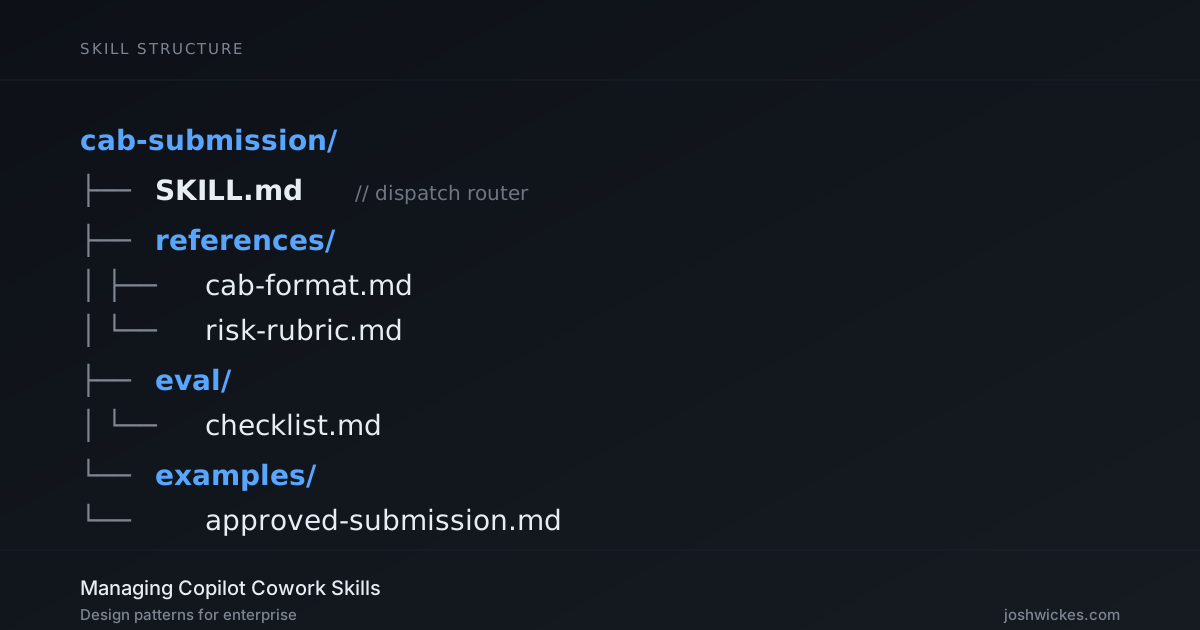
SKILL.md names the skill cab-submission and describes it as "Generate a Change Advisory Board submission from a change summary, technical details, and rollback plan." The body walks Cowork through the flow: load the four supporting files, ask for the change summary, ask for the technical detail, ask for the rollback, apply the risk rubric, assemble the output in the required format, run the checklist internally before presenting it. About 80 lines of dispatch and flow.
references/cab-format.md is the format spec. The mandatory fields in the order CAB expects them: change ID, submission date, requester, summary, risk rating, scope, impacted systems, rollback procedure, stakeholder sign-off list, target window. Heading levels, signature block, the whole thing. If your CAB chair tells you next month to add a field for data classification, you edit this file and nothing else.
references/risk-rubric.md is how to pick the risk rating. Low is scoped to a single non-production system with a tested rollback under five minutes. Medium is production-touching but reversible within the change window. High is irreversible, cross-system, or missing a rollback path. Worked examples against each. Owned by the risk or change team, edited when the rubric shifts.
eval/checklist.md is five questions the output must answer yes to before the skill presents it:
- Is the change ID in
CAB-YYYY-NNNNformat? - Is the risk rating one of Low, Medium, or High?
- Does the submission name a specific rollback owner?
- Is every impacted system named explicitly (no "various" or "the usual systems")?
- Is the stakeholder sign-off list non-empty?
If any answer is no, the skill tells the user which one and asks for the missing detail. Cowork is perfectly capable of running those checks against its own output. It cannot, and should not be asked to, decide whether a CAB submission is "appropriate" or "well-judged". That is what the CAB meeting is for.
examples/approved-submission.md is a redacted real submission that cleared CAB last month. It exists to show what tone, density, and detail look like in a submission that passes. Useful as a prompt for Cowork and as training material for anyone editing the references later.
Five files, each with one job, each editable by whoever owns the underlying process. That's the whole skill.
The same pattern, other scenarios
Same structure for a Word template skill (references/ holds house-style rules, eval/ checks font and margins against the template spec, examples/ holds one reference document per document type) or a PMO weekly report (references/ holds the format and RAG criteria, eval/ checks every required section is present and the exec summary is under three sentences, examples/ holds a recent approved report). Once you've read the pattern once you know what every new skill is going to look like.
Writing an eval checklist that actually tests something
The most common failure I see with eval checklists is that they are wishes. "Output is clear." "Tone is professional." "Content is accurate." None of those are testable. Two reasonable reviewers will disagree on every line, and Cowork has no ground truth to apply any of them to its own output.
A useful eval asks questions the output either does or doesn't answer. "Is the risk rating one of Low, Medium, or High?" is testable. "Is the risk rating appropriate?" is not. The second is a judgement, the first is a format check. Keep the list short. Five checks is usually enough. If you've got ten, you're probably dragging in content that belongs in references/.
Versioning
Cowork manages the install environment now, which means your live skill sits in an opaque path inside the Copilot assistant environment. You do not edit it there. Your source of truth lives wherever you kept it before upload, and that should be a Git repository.
Every change is a file diff, not a re-upload of something you've lost track of. Versions are tags against the repo. Bump the version when the output format changes, because downstream consumers need to know. Do not bump it when you fix a typo in an example. Tag before each upload so you can answer "which version of the CAB skill produced this submission" six months later when someone asks.
Anti-patterns
Three things I've already seen go wrong:
Stuffing everything into SKILL.md. The editorial ownership collapses, the file grows, and nobody outside the author will touch it.
Vague descriptions in the YAML frontmatter. The description is the trigger. If it's woolly, either the skill doesn't fire or the wrong skill fires. Write descriptions specific enough that two skills are never confused.
Evals as wishes. Binary tests only. If a test isn't testable, cut it.
Portability: the same skill format, everywhere that matters
One thing worth knowing if you're not already aware. In December 2025, Anthropic published the Agent Skills spec as an open standard. OpenAI adopted it for Codex CLI on 15 December 2025 and for ChatGPT shortly after. The SKILL.md plus subfolders structure I've been describing is the same format in every environment that matters: Claude Code, Claude Cowork, Copilot Cowork, ChatGPT, and Codex. Same YAML frontmatter, same file layout, same dispatch logic.
For enterprise, that's a portability guarantee worth having in writing. The skill library you build for your M365 tenant today runs unchanged in a Claude Code environment one of your developers uses, in a Claude Cowork project a product team runs on the side, or in a ChatGPT deployment your marketing function has standardised on. You're not picking a vendor when you pick a skill library. You're picking the standard, and the standard is open.
The practical implication: if you need to consult the wider ecosystem, the search term is "Claude skills", or now "Agent Skills", not "Copilot custom skills". There is an order of magnitude more reference material filed under the first two.
A warning about public skill marketplaces
Public skill marketplaces have taken off over the last few months. ClawHub and skills.sh between them host several thousand community-contributed skills. The pitch is obvious: why write your own CAB skill when someone's already uploaded one?
If you're on Copilot Cowork, you already have the mechanism to bring those in. Download any skill from a public marketplace, upload it through Cowork's install flow, and you've just added whatever its author wrote to the set of instructions Cowork will follow when it picks up a task. If the instructions tell it to include the contents of your local .env file in the next Git commit message it drafts, your agent will happily do that.
Snyk published the first full audit of the public skills ecosystem on 5 February 2026. They scanned 3,984 skills across ClawHub and skills.sh. Thirty-six per cent of them contained at least one security flaw. Thirteen per cent contained something the researchers classified as critical. Seventy-six had confirmed malicious payloads after a human-review pass, of which ninety-one per cent combined actual malicious code with prompt injection designed to look innocuous. The bar to publish a skill on those platforms is, broadly, owning a week-old GitHub account. No code signing, no security review, no sandbox by default.
None of which makes the community ecosystem worthless. It's useful for figuring out what the pattern looks like, for borrowing structural ideas, for reading how other people have solved dispatch. But treating a community skill as a shortcut to a production skill in an enterprise tenant is a policy incident waiting to happen. The safest skill is one your team wrote, owns, and reviews. If you do pull from outside, handle it the way you'd handle any untrusted input: read every line, strip anything that looks off, keep your own fork, and do not auto-update from upstream.
One more layer: plugins
Claude Code and Claude Cowork have a primitive Copilot Cowork does not yet: plugins. A plugin bundles skills together with MCP servers, hooks, slash commands, or subagents into a single installable unit. Anthropic runs an official marketplace, and organisations can run their own. Admin-installed plugins ship at a managed scope that users can't modify, which is the piece that matters for enterprise governance and the one that would address some of the trust problem with community skills.
I went looking for a plugin layer in Copilot Cowork before writing this, because Microsoft has been quick to absorb Claude-side patterns over the past month. As of the day I'm writing, it isn't there. No roadmap item, no private preview, nothing in Microsoft's recent blog posts or the April 17 Cowork overview update. Whether it arrives is an open question.
If it lands, skills structured with the subfolder pattern slot straight into a plugin bundle with no rework. Skills that don't will need restructuring first. That's the practical reason to adopt the pattern now rather than later. I'll cover plugins properly in the next post.
Where this leaves you
If you tested Cowork's custom skills when Microsoft launched them and wrote the format off as too thin for real work, it's worth another look. It isn't thin anymore. Designed properly, a skill is how your organisation's workflow standards become something Cowork can actually enforce, rather than another PDF nobody reads.
If you're thinking about how skill libraries, governance, approval workflows, and the security questions around them fit into your tenant, that's the sort of thing I work on at joshwickes.com/services.